Included files
Review the product description or contact support if the supplied-file list is not yet published.
Original price was: $ 50.$ 20Current price is: $ 20.
Secure delivery
Log in to downloadComplete product information
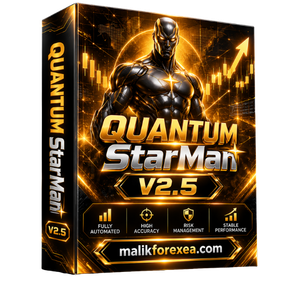
Quantum StarMan EA MT5 V2.5 is an automated multi-currency Forex trading robot designed for MetaTrader 5. It is marketed as a system that can manage multiple currency pairs from a single chart, using a grid-based trading strategy to automate entries and position management. The product documentation lists pairs including AUDUSD, EURAUD, EURUSD, GBPUSD, and USDCAD.
For traders exploring automated trading systems, Quantum StarMan EA MT5 V2.5 offers a way to evaluate multi-pair trading without manually placing every order. However, grid-based strategies can accumulate significant exposure during persistent market moves, so risk management and independent testing are essential.
You can also explore more Forex Expert Advisors and trading resources at bullfx.net.
Quantum StarMan EA MT5 V2.5 is promoted as a fully automated Expert Advisor developed for traders who want to run a multi-currency trading strategy through MetaTrader 5. Rather than manually analyzing each currency pair and placing every order, users can configure the EA to execute its programmed trading logic.
The original MQL5 product page describes Quantum StarMan as a multi-currency EA that can trade five currency pairs from one chart attachment. It uses a grid strategy rather than claiming to rely on a traditional Martingale strategy, and it includes an option to close trades when account drawdown reaches a configured limit.
Important version note: The original MQL5 listing currently identifies a newer version, V4. Third-party websites continue to advertise V2.5 packages for particular MT5 builds. Confirm that the file you purchase is actually V2.5 and that it is compatible with your terminal.
| Feature | Details |
|---|---|
| Product name | Quantum StarMan EA MT5 |
| Requested version | V2.5 |
| Platform | MetaTrader 5 |
| Trading style | Automated multi-currency grid strategy |
| Currency pairs | AUDUSD, EURAUD, EURUSD, GBPUSD, USDCAD |
| Chart attachment | One chart, according to the original product instructions |
| Trade management | Grid-based position management |
| Drawdown control | Account-level close-all option advertised |
| Timeframe | Product describes flexible timeframe compatibility |
| Account type | Hedging account recommended by the original listing |
| VPS | Required by the original listing for continuous operation |
| DLL access | Required by some V2.5 distributions |
| Starting balance | Original listing recommends $500 minimum and $1,000 preferred at 1:500 leverage |
Specifications are based on the original product page and third-party V2.5 listings. Requirements can differ by distribution and MT5 build.
One of the main advertised features of Quantum StarMan EA MT5 V2.5 is its ability to manage several currency pairs from a single chart attachment.
The original listing identifies these five pairs:
AUDUSD
EURAUD
EURUSD
GBPUSD
USDCAD
This functionality can reduce the need to monitor each chart individually. However, trading multiple pairs simultaneously increases the importance of monitoring total account exposure. Several pairs can react to the same US dollar movement, so multi-currency trading does not automatically mean lower risk.
Quantum StarMan uses a grid-based approach to position management. Grid systems place multiple orders according to predefined price conditions rather than relying exclusively on a single entry and exit.
The product developer describes the system as a grid strategy that does not rely on a conventional Martingale strategy.
However, grid trading can still create substantial floating losses when prices move persistently against open positions. Additional entries do not remove the underlying risk, and a high win rate does not necessarily mean a strategy has a favorable risk-to-reward profile.
Before running the EA live, check its maximum position count, lot-sizing rules, grid spacing, and behavior during extended trends.
Once installed and enabled, an Expert Advisor can monitor market conditions and execute its programmed orders through MetaTrader 5.
Automated execution can help maintain consistent trading rules and reduce manual intervention. Nevertheless, actual execution depends on the broker, available margin, spreads, slippage, and whether the terminal remains connected.
The original Quantum StarMan listing advertises an option to close all trades when total account drawdown reaches a predefined limit.
This can be a useful control if configured correctly, but traders should verify exactly how the limit is calculated. For example, determine whether it measures equity decline from the initial balance, peak equity, or another reference point.
A configured drawdown limit should never be treated as an absolute guarantee against larger losses. Slippage, gaps, execution delays, and other trading conditions can affect the final result.
The original product page states that the EA can be attached to a chart using different timeframes. Its multi-currency logic is designed to operate from one chart attachment rather than requiring a separate EA instance on every supported pair.
Follow the installation instructions supplied with your specific V2.5 package. Do not attach multiple copies to different charts unless the provider explicitly confirms that doing so is supported, as duplicate instances may create unwanted duplicate trades.
A Forex VPS allows MetaTrader 5 to continue running even when your home computer is switched off. The original listing recommends VPS operation for continuous trading.
A VPS can improve uptime, but it does not improve the EA’s strategy or guarantee profitability. Continue monitoring account equity, margin levels, and trading activity.
Follow the instructions supplied with your authorized package. The exact steps may differ depending on whether the distributor provides an EX5 file, installer, or additional dependencies.
Verify the package. Confirm that the file is Quantum StarMan V2.5 and supports your installed MT5 build.
Open MetaTrader 5. Log in to your broker account, preferably a demo account for initial testing.
Open the data folder. Select File → Open Data Folder.
Locate the Experts directory. Open MQL5 → Experts and install the EA according to the provider’s instructions.
Restart or refresh MT5. Find the EA in the Navigator panel.
Prepare the required currency pairs. Add AUDUSD, EURAUD, EURUSD, GBPUSD, and USDCAD to Market Watch if your package requires them.
Attach the EA to one chart. The original product instructions specify using one chart, EURUSD, to avoid duplicate trades.
Configure risk settings. Review lot size, grid parameters, account drawdown limits, and any maximum-position settings available.
Verify trading permissions. Enable automated trading only after confirming the file and its requirements.
Run a demo test. Observe how the EA opens and closes trades before considering live use.
Some Quantum StarMan V2.5 distributions are advertised as requiring DLL access.
A trading robot should be evaluated by its risk-adjusted results, not simply its advertised win rate or profit.
An independent research page reports a measured historical drawdown of approximately 59.6% for Quantum StarMan in its tracked account. This is a third-party measurement, not a guarantee that every configuration will experience the same drawdown, but it is an important reason to investigate risk carefully.
Before using Quantum StarMan EA MT5 V2.5, evaluate:
Maximum drawdown: How far did equity fall from a previous peak?
Grid exposure: How many positions can accumulate during a sustained trend?
Lot sizing: Does the EA increase position sizes after losses?
Profit factor: Are gross profits meaningfully larger than gross losses?
Live trading history: Are results supported by a transparent, independently verifiable account?
Execution costs: How do spreads, commissions, swaps, and slippage affect the outcome?
Stress testing: What happens during sharp currency movements or prolonged adverse market conditions?
Backtests and simulated results can help evaluate a strategy, but neither guarantees future performance. Start with conservative settings and forward-test the EA on a demo account.
Potential advantages
Automated trading across multiple currency pairs.
Grid-based position management.
Single-chart operation according to the original product instructions.
Advertised account-level drawdown control.
Can be tested through MetaTrader 5 before live deployment.
Important disadvantages
Grid trading can accumulate significant floating losses.
Several currency pairs may share correlated market risk.
Some V2.5 distributions require DLL access.
Results depend on settings, broker conditions, and market behavior.
A drawdown control does not guarantee that losses will remain within the configured limit.
Yes. It is marketed as an automated Expert Advisor that executes and manages trades through MetaTrader 5. The exact functionality depends on the version and configuration.
The original listing specifies AUDUSD, EURAUD, EURUSD, GBPUSD, and USDCAD. Verify the supported pairs in your particular V2.5 package.
The original developer describes the strategy as grid-based rather than conventional Martingale. However, grid-based trading can still accumulate positions and increase account exposure. Inspect the lot-sizing and recovery rules in the exact build before using it.
The original listing recommends at least $500 and prefers $1,000 with 1:500 leverage. These are vendor recommendations, not guarantees of safety or suitability for your account.
No. Automated trading systems can lose money, and grid-based strategies may experience substantial drawdowns. Past performance does not guarantee future results.
Quantum StarMan EA MT5 V2.5 is marketed as a multi-currency Forex robot that automates grid-based trading across five currency pairs from a single chart. Its advertised features include automated execution and an account-level drawdown control option.
The most important consideration is its risk profile. Before using it on a live account, confirm the exact V2.5 build, inspect the grid and lot-sizing rules, verify the drawdown control, and test the system on a demo account.
Explore more Expert Advisors and trading resources at bullfx.net.
Financial disclaimer: This article is for educational and informational purposes only and does not constitute financial advice. Forex trading involves substantial risk, and you may lose some or all of your invested capital.
Confirm the supplied MetaTrader platform, version, and included-file information before purchase.
Protected files remain attached to eligible BullFX orders or membership access.
Scan supplied files and begin on a demo account with appropriate risk controls.
Review the product description or contact support if the supplied-file list is not yet published.
Follow the BullFX installation guide and verify compatibility before loading files into MetaTrader.
Confirmed updates appear in the eligible customer account when supplied.
Purchase does not imply resale or redistribution rights unless the product terms explicitly grant them.
Trading software can lose money and does not guarantee an outcome.





Reviews
There are no reviews yet.