Included files
Review the product description or contact support if the supplied-file list is not yet published.
Original price was: $ 50.$ 20Current price is: $ 20.
Secure delivery
Log in to downloadComplete product information
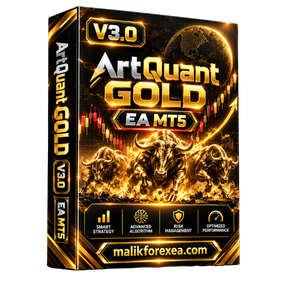
ArtQuant Gold EA V3.0 MT5 is marketed as an automated Gold trading Expert Advisor for MetaTrader 5. The product is designed specifically for XAUUSD and uses a multi-module trading engine with portfolio management, exposure controls, execution filters, and account-protection features. The official MQL5 listing now shows a newer version, so traders looking specifically for V3.0 should verify the exact version and compatibility of the package they obtain.
For traders researching automated Gold trading tools, ArtQuant Gold EA V3.0 MT5 offers a focused approach to XAUUSD trading. Before using it on a live account, however, it is important to understand its strategy, configuration requirements, and potential drawdown.
You can also explore other Expert Advisors and trading resources at bullfx.net.
ArtQuant Gold EA V3.0 MT5 is an automated trading system designed exclusively for Gold trading through MetaTrader 5. Unlike a general-purpose Forex robot, ArtQuant Gold focuses on XAUUSD or a compatible broker-specific Gold symbol.
The official product documentation describes a multi-module trading engine with centralized portfolio management. Its features include trading-direction controls, exposure limits, execution filters, and virtual trade-management protections.
Third-party listings for V3.0 describe an M15 setup, while the official product documentation says the internal strategy is independent of the chart timeframe. Because these descriptions may refer to different distributions, confirm the requirements for your exact V3.0 package before installation.
| Feature | Details |
|---|---|
| Product name | ArtQuant Gold EA |
| Version | V3.0 |
| Platform | MetaTrader 5 |
| Trading instrument | Gold (XAUUSD) |
| Timeframe | M15 on one V3.0 listing; official logic described as timeframe-independent |
| Strategy architecture | Multi-module trading engine |
| Trading directions | Buy, Sell, or Both, according to official documentation |
| Trade management | Centralized portfolio and cycle management |
| Risk controls | Exposure limits and account-protection options |
| Execution filters | Available; exact settings depend on version |
| Account type | Hedging account |
| Broker conditions | ECN, RAW, or low-spread conditions preferred |
| VPS | Recommended for continuous live operation |
| Setfiles | Availability depends on the specific distribution |
The official MQL5 product page currently identifies a newer release than V3.0. Third-party V3.0 listings may differ in timeframe, included files, build requirements, and risk settings, so verify those details with your supplier.
ArtQuant Gold EA is built specifically for XAUUSD rather than being advertised as a universal robot for every Forex pair. It is intended to automate trading decisions and position management in the Gold market.
Gold prices can move rapidly in response to US economic data, interest-rate expectations, geopolitical developments, and changes in the dollar. An automated EA can follow its programmed rules, but it cannot eliminate market risk or guarantee profitable trades.
One of the product’s central features is its multi-module trading architecture. The official listing describes up to 20 independent internal modules and centralized management of trading activity.
A modular design can allow a trading system to manage different internal strategies or trading components within one EA. However, more modules do not automatically mean better performance. The important questions are how each module behaves, how much exposure it creates, and whether several modules can accumulate risk simultaneously.
ArtQuant Gold EA includes portfolio-management features intended to coordinate its trading activity and control exposure. The official documentation also describes limits for total and module-level exposure.
These controls are particularly important for Gold trading, where a strong directional move can produce significant losses if the EA has accumulated several positions.
Before live deployment, examine the maximum exposure settings, lot-sizing method, simultaneous-module limits, and drawdown-control options available in your exact version.
The official product documentation lists three trading-direction modes:
Buy: Allows buy-side trading.
Sell: Allows sell-side trading.
Both: Allows trading in either direction according to the EA’s rules.
These options provide flexibility when configuring the EA. However, selecting a direction does not guarantee that the market will move as expected. Test the selected mode using historical data and demo trading before committing real funds.
ArtQuant Gold’s official documentation describes broker setup profiles for different trading environments, including ECN, RAW, and low-spread accounts. It also includes execution filters and market-condition information.
These settings matter because trading costs can have a substantial impact on an automated Gold strategy. Spreads, commissions, slippage, swap charges, and broker execution quality can cause live results to differ from backtests.
Choose the profile that matches your actual broker conditions. Do not use a configuration intended for a different broker without testing it first.
The official product page describes virtual trade management and account-protection tools.
Virtual management can allow the EA to manage certain exit conditions internally rather than relying exclusively on conventional broker-side stop orders. However, virtual protections may depend on the terminal remaining active and connected.
Understand how the EA behaves during a connection failure, terminal restart, price gap, or execution delay. Software-based protection cannot guarantee an exit at a specific price.
The official documentation describes a control panel that can show active modules, market and spread information, entry-filter status, and current EA exposure. It also describes manual pause and close controls.
These controls can help users monitor the EA’s activity. Be aware that pausing new trading cycles does not necessarily stop the EA from managing existing positions, and manually closing trades may realize a loss.
Use the instructions supplied with your authorized V3.0 package. Installation requirements may differ between official and third-party distributions.
Verify the EA version. Confirm that the package is specifically V3.0 and is compatible with your MT5 terminal build.
Open MetaTrader 5. Log in to your broker account, preferably a demo account.
Install the EA. Follow the supplier’s instructions for installing the .ex5 file or official Market product.
Open a Gold chart. Select XAUUSD or your broker’s equivalent Gold symbol.
Attach the EA. Use the timeframe specified by your package documentation.
Select the broker profile. Choose the appropriate supported profile for your account’s execution conditions.
Review the risk settings. Check base lot size, maximum exposure, enabled modules, trading direction, and drawdown limits.
Configure the Magic Number. Use the recommended unique identifier, and do not change it while the EA has active trading cycles unless the documentation permits it.
Test on demo. Monitor entries, exits, margin usage, and drawdown before considering live deployment.
A .set file stores supported input parameters for an EA. If your V3.0 package includes a setfile, confirm that it was prepared for the same EA version and a compatible broker configuration. Do not assume that a preset from a newer release will work correctly with V3.0.
A VPS can keep MetaTrader 5 running continuously, which is particularly relevant when an EA relies on ongoing terminal operation to manage trades.
Only use software obtained from a trusted source. If a third-party package requests DLL access or other elevated permissions, verify why they are needed before enabling them.
Backtesting is essential when evaluating an automated Gold trading system. It helps traders examine how the EA behaves under historical market conditions, although it cannot predict future results.
For a more useful evaluation, check:
Maximum equity drawdown: The largest decline in account equity.
Maximum exposure: The number and size of simultaneous open positions.
Profit factor: Gross profit divided by gross loss.
Trading costs: Spreads, commissions, swaps, and slippage.
Performance consistency: Whether results depend heavily on a short period or a few large trades.
Module behavior: Whether different internal modules increase overall exposure when Gold trends strongly.
Live versus backtest results: Whether forward testing supports the historical findings.
The official documentation recommends realistic testing with available historical tick data and warns that broker conditions can change the results.
Do not judge ArtQuant Gold EA solely by its reported win rate or total profit. A strategy may have many winning trades while still carrying substantial exposure during adverse market conditions.
Potential advantages
Focused on Gold trading through MT5.
Multi-module trading architecture.
Centralized position and exposure management.
Buy-only, sell-only, and combined trading modes.
Execution filters and broker profiles.
On-chart information and manual controls.
Important limitations
Exact features may differ between V3.0 and newer releases.
Gold can experience sudden, large price movements.
Multiple modules can create overlapping exposure.
Virtual protection can depend on terminal connectivity.
Backtests and seller claims do not guarantee future profitability.
Yes, it is marketed as an Expert Advisor for MetaTrader 5. Confirm the terminal build and exact version requirements for the package you have.
The official product is designed specifically for Gold, or XAUUSD and compatible broker-specific Gold symbols.
One third-party V3.0 listing specifies M15, while the official product documentation describes timeframe-independent internal logic. Follow the instructions for your exact version and distribution.
No. Trading results depend on market conditions, settings, execution costs, and account risk. You can lose money even when an EA has produced positive historical results.
Beginners should start with demo testing and learn how the EA manages positions, margin, and drawdown before considering live trading.
ArtQuant Gold EA V3.0 MT5 is marketed as a Gold-focused automated trading system with a multi-module engine, portfolio management, execution filters, and account-protection features.
Its configuration and risk settings deserve careful attention, particularly because the product’s current official version is newer than V3.0 and third-party listings differ in their specifications. Verify your exact package, test it on a demo account, and assess drawdown and exposure before risking real capital.
For more Expert Advisors and automated trading resources, visit bullfx.net.
Financial disclaimer: This article is for educational and informational purposes only and does not constitute financial advice. Gold and Forex trading involve substantial risk, and you may lose some or all of your invested capital.
Confirm the supplied MetaTrader platform, version, and included-file information before purchase.
Protected files remain attached to eligible BullFX orders or membership access.
Scan supplied files and begin on a demo account with appropriate risk controls.
Review the product description or contact support if the supplied-file list is not yet published.
Follow the BullFX installation guide and verify compatibility before loading files into MetaTrader.
Confirmed updates appear in the eligible customer account when supplied.
Purchase does not imply resale or redistribution rights unless the product terms explicitly grant them.
Trading software can lose money and does not guarantee an outcome.




Reviews
There are no reviews yet.